CONTAINER APPS · GUIDE
Deploy from Git
Point us at a git repository that contains a docker-compose.yml. We clone it, build every service's image on our own infrastructure — you don't need a container registry — and deploy the whole stack, wired together, on the CDN.com.tr managed container platform. It's the fastest path from “my repo” to “running in production”.
A repository with a docker-compose.yml — or just a Dockerfile. Services with a build: section are built from their Dockerfile; services that reference a public image: (databases, caches, queues) are used as-is and wired in as managed add-ons or apps. A repository with no compose file but a Dockerfile (at the root, or in the folder of the compose path you give) deploys as a single app built from it, listening on the port of its EXPOSE line (8080 if it has none). That's it — no registry account, no image pushing, no CI setup.
1 · Open “Deploy from Git”
In your CDN account open Platforms → Container Apps, expand App creation, and click Deploy from Git (next to Import from Docker Compose).
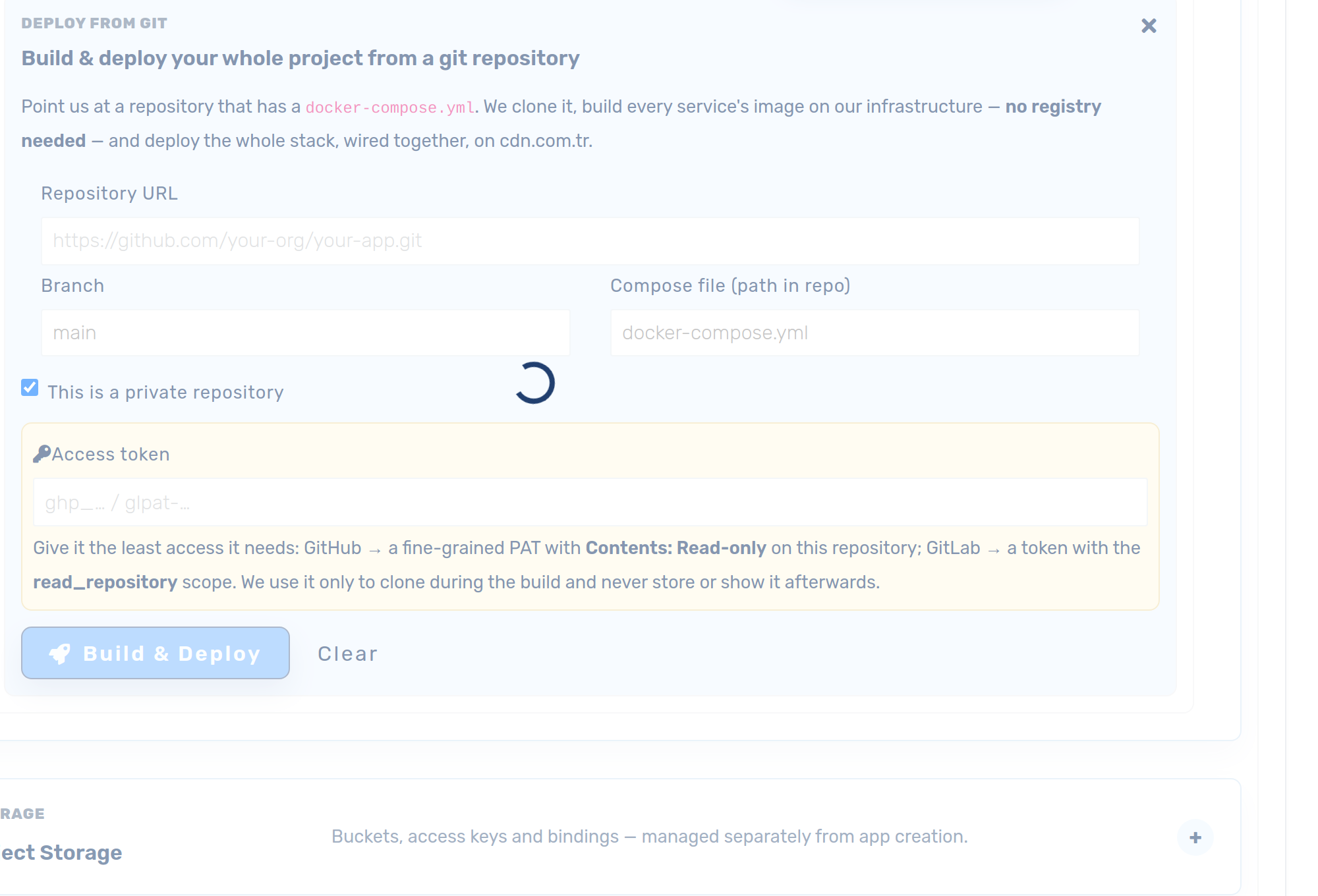
2 · Fill in your repository
- Repository URL — the
https://clone URL, e.g.https://github.com/your-org/your-app.git. - Branch — the branch to deploy (defaults to
main). - Compose file — path to the compose file inside the repo (defaults to
docker-compose.yml). Build contexts are resolved relative to this file, so a compose kept in a subfolder works fine. No compose file there? A Dockerfile in that folder, or at the repository root, is used instead.
3 · Private repositories & access
GitHub (recommended): click “Connect GitHub”. A one-click GitHub App installation lets you pick repositories from a dropdown — no tokens to create, copy or rotate, and it also powers auto-deploy webhooks (step 5). You choose exactly which repositories the app can see, and can revoke it on GitHub at any time.
Alternatively — or for GitLab — tick This is a private repository and paste an access token. Give it the least access it needs:
- GitHub — a fine-grained Personal Access Token scoped to this one repository with Contents: Read-only.
- GitLab — a project or personal access token with the read_repository scope.
A pasted token is used only to clone your repository during the build. It is stored write-only for the duration of the build and is never shown back or reused — revoke it any time.
4 · Build & deploy
Click Build & deploy. A live progress bar shows each step:
- Reading compose — we clone your repo and parse the compose file.
- Building <service> — each
build:service's image is built from its Dockerfile in a sandboxed builder and pushed to our private registry. - Deploying — every service becomes a container app, wired to the others by service name (exactly like
docker-compose), with databases/caches attached.
When it finishes, web-facing services are exposed automatically on an instant <uid>.cdn.com.tr subdomain (you can attach your own domain any time) — open Your apps to see them running.
5 · Keep connected — auto-deploy & the deployment pipeline
Tick “Keep connected — auto-deploy on every push to this branch” before deploying. From then on, every push to the branch rebuilds and redeploys automatically — and the Deployment pipeline card appears on Container Apps:
- Enable staging on the card and pushes deploy a Staging test copy (on its own test URL) instead of production — production only changes when you click Promote, with one-click rollback.
- This is the recommended way to run a connected repository: no more “every commit redeploys production”.
Full walkthrough: Deployment pipeline — push → Staging, Promote → Production.
PHP and Laravel apps
A PHP app deploys from Git the same way: from a Dockerfile that serves HTTP on one port. Run cdnctl init in the repository to generate one. For a Laravel project (it finds artisan and public/index.php) the Dockerfile serves public/ only, enables mod_rewrite and installs the MySQL PDO driver. Commit it and deploy as above. The core of it:
FROM php:8.4-apache
WORKDIR /var/www/html
RUN apt-get update && apt-get install -y --no-install-recommends unzip \
 && rm -rf /var/lib/apt/lists/*
COPY . .
RUN curl -sS https://getcomposer.org/installer | php -- --install-dir=/usr/local/bin --filename=composer \
 && composer install --no-dev --no-interaction --prefer-dist \
 && chown -R www-data:www-data /var/www/html
# Serve public/ only; route every path to public/index.php
ENV APACHE_DOCUMENT_ROOT=/var/www/html/public
RUN sed -ri "s!/var/www/html!${APACHE_DOCUMENT_ROOT}!g" /etc/apache2/sites-available/*.conf \
 && sed -ri "s!/var/www/!${APACHE_DOCUMENT_ROOT}!g" /etc/apache2/apache2.conf /etc/apache2/conf-available/*.conf \
 && a2enmod rewrite && docker-php-ext-install pdo_mysql \
 && sed -ri "s/^Listen 80$/Listen 8080/" /etc/apache2/ports.conf \
 && sed -ri "s/:80>/:8080>/" /etc/apache2/sites-available/000-default.conf
EXPOSE 8080
Set APP_KEY, the database settings and other configuration as the app's environment variables, not in a committed .env. A build has no database, so migrations do not run during the build; run them from your app's own start command or release step. Match the FROM line to the PHP version your composer.lock was resolved on.
How it works (and why it's safe)
- We build your images from your Dockerfiles — no registry account needed. Multi-stage builds,
target:andbuild.argsare honored; a${VAR}inbuild.argsis filled in from the app's environment variables, and everyNEXT_PUBLIC_*variable is passed to the build, so a Next.js app has them atnext build. Secrets are never passed to a build — build arguments end up in the image. - Sandboxed builds & runtime. Both the build and your running containers execute under a hardened gVisor sandbox, isolated from other tenants and the host.
- Service discovery — apps in your account reach each other by service name, just like compose. Databases, Redis and NATS are provisioned as managed add-ons.
- Ship safely. Combine this with Blue/Green preprod to test a copy on its own URL before taking it live.