
Who is listening to this header
One response passes through several caches: the visitor's browser (private — serves one person), the CDN edge (shared — serves everybody), and sometimes a proxy in between. Cache-Control is how the origin talks to all of them at once, which is why directives exist to address them separately.
That distinction drives everything else. A logged-in dashboard may be cacheable in that user's browser and must never be cached at the edge where another user could receive it. A public marketing page is the opposite: cache it hard at the edge, briefly in the browser. Deciding "private or shared" first makes every other choice obvious.
The directives that actually matter
max-age=N — reusable for N seconds without asking again. The main dial.
s-maxage=N — same, but only for shared caches (the CDN). When present, the edge obeys it and ignores max-age, so you can keep something at the edge for an hour while browsers hold it for a minute.
public / private — public may be stored by any cache; private restricts storage to the individual browser. Anything user-specific must be private.
no-cache — store it, but revalidate with the origin before each reuse. Cheap when unchanged: the server can answer 304 Not Modified with no body.
no-store — never write it to any cache, in memory or on disk. Reserve this for genuinely sensitive responses; it is not "please be fresh", it is "keep no copy at all".
immutable — this body will never change at this URL, so do not even revalidate on reload. Only truthful for versioned filenames.
stale-while-revalidate=N — after expiry, keep serving the stale copy for up to N seconds while a fresh one is fetched in the background. The visitor never waits for the refetch.
Three recipes that cover most sites
Versioned static assets — the filename changes whenever the content does, so the URL is safe to cache forever. This is the single biggest, safest caching win available.
HTML pages — the URL stays the same while the content changes, so it needs a short life. A brief max-age plus stale-while-revalidate gives you speed without serving yesterday's page.
Private or personalised responses — dashboards, carts, anything behind a login. Keep it out of shared caches; the browser may hold it briefly if that is safe for you.
Copy-paste starting points — tune the numbers to your release cadence
# versioned assets: /js/app.a1b2c3.js
Cache-Control: public, max-age=31536000, immutable

# HTML pages (short at the browser, longer at the edge, no waiting on refresh)
Cache-Control: public, max-age=60, s-maxage=600, stale-while-revalidate=86400

# per-user pages: never at the edge
Cache-Control: private, no-store

# an API response that changes often but can lag a little
Cache-Control: public, max-age=0, s-maxage=30, stale-while-revalidate=60
no-cache vs no-store: the mistake worth avoiding
These read like synonyms and behave nothing alike. no-cache permits storage but requires revalidation before reuse — the copy stays, and when it is still current the server replies 304 with no body, which is very cheap. no-store forbids keeping the response anywhere.
Reaching for no-store when you mean no-cache throws away every optimisation for no benefit: every request becomes a full download even when nothing changed. Use no-store only when a stored copy is itself the problem — bank statements, password reset pages, anything that must not sit in a shared machine's cache. For "always show the latest", no-cache is the correct and far cheaper answer.
How this interacts with your CDN
The headers your origin sends are what the edge obeys when it decides how long to keep a copy — which makes Cache-Control the control surface for your whole delivery chain, not a browser detail. Send s-maxage and the edge follows it; send no-store and the edge refuses to cache at all, so every request travels to your origin and you have effectively turned the CDN off for that response.
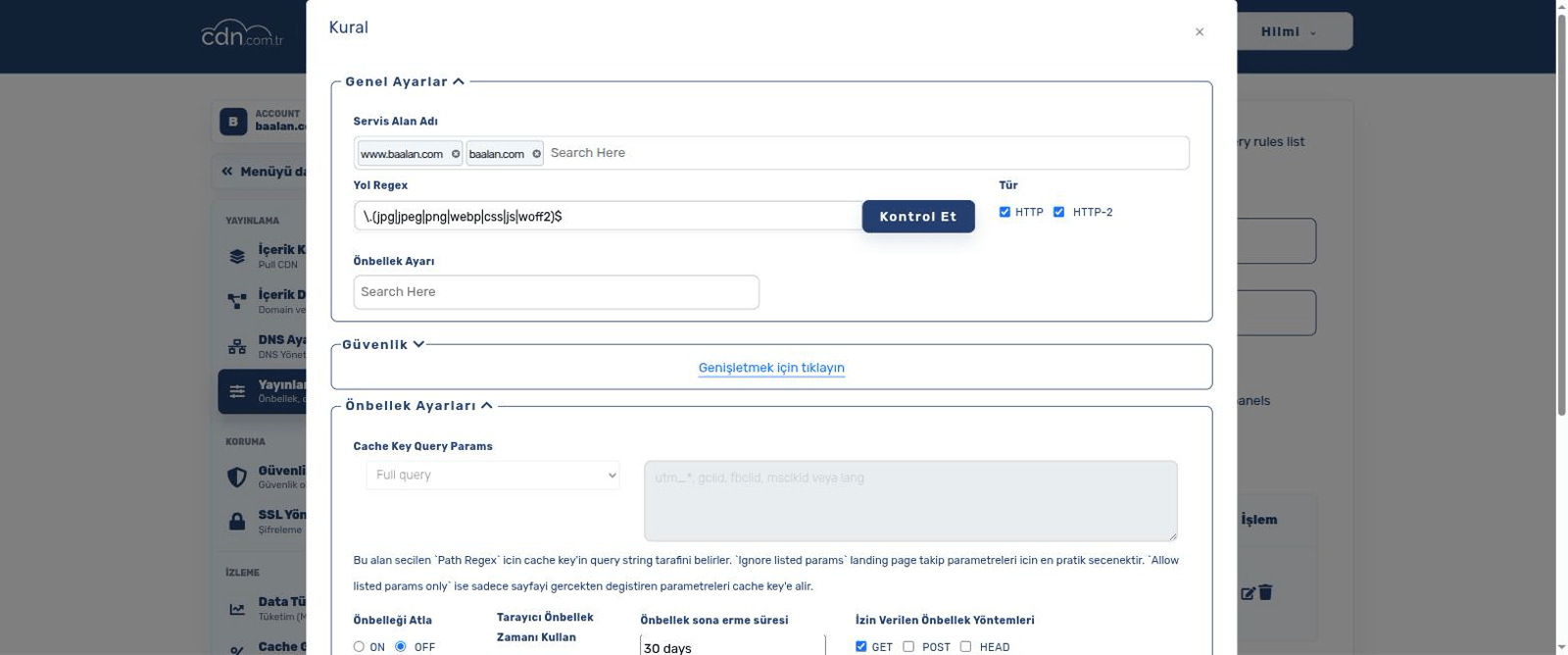
On cdn.com.tr you can also set caching behaviour per delivery rule in the panel when you cannot change the application's headers — useful for legacy apps you would rather not touch. When you do change what a cached URL returns, remember the edge is still holding the previous copy until it expires: that is what a purge is for.
Which one wins depends on the rule, and it is visible in the panel: with Follow your origin's cache headers, your origin's header both sets the edge duration and reaches the browser unchanged. Choose Cache for a fixed time on that rule and the origin headers are ignored — and not only at the edge, the header the browser receives is rewritten with our value too. One or the other per rule, never both.
A small tell: if a response carries two separate Cache-Control lines, the second was added by the edge, not your origin. A single comma-joined line is the one you wrote. A real four-tier example: how a news site sets its cache headers.
Checking what you actually send
Assumptions about headers are frequently wrong — a framework, plugin or web-server default often overrides what you think you configured. Verify with one command per URL type, and check both a versioned asset and an HTML page, since they should look completely different. Watch also for a Set-Cookie on a response you meant to cache publicly: many caches refuse to store those, and it is a common reason a page mysteriously never caches.
Read the real response headers
# see what the edge and origin actually say
curl -sI https://example.com/ | grep -i "cache-control\|age\|set-cookie"

# compare a versioned asset (should be a long max-age)
curl -sI https://example.com/js/app.a1b2c3.js | grep -i cache-control
ETag and revalidation (If-None-Match, 304 Not Modified)
An ETag is a fingerprint the server attaches to a response, such as ETag: "5f2b-1a3c". When the cached copy goes stale, or when Cache-Control says no-cache, the browser does not download the file again blindly: it sends the fingerprint it holds in If-None-Match. If nothing has changed, the server answers 304 Not Modified with headers only and no body, the browser keeps using its copy and the freshness clock starts again. That is what makes no-cache cheap.
ETags come in two strengths. A plain value ("abc") is a strong ETag: it promises byte-for-byte identical content, which range requests and resumed downloads rely on. A W/ prefix (W/"abc") marks a weak ETag: the content is equivalent but not necessarily the same bytes, as with a gzip and a Brotli version of one page. For revalidation the difference does not matter, because If-None-Match uses weak comparison: W/"abc" and "abc" match.
Last-Modified is the older, date-based validator. The server sends Last-Modified with a date, the browser asks back with If-Modified-Since carrying the same date, and an unchanged resource gets the same 304. It counts in whole seconds and depends on the file's timestamp, so when both are present the ETag is the sharper check.
ETags differ between servers more often than people expect. Apache and nginx build the default ETag of a static file from its modification time and size, so the same file deployed to two origin servers with different timestamps gets two different ETags. Behind a load balancer the browser then receives a full 200 instead of a 304 whenever the other server answers. Keep validators identical across origins: ship one build artefact that preserves modification times (rsync -a, a tar archive), or generate the ETag from a hash of the content.
On cdn.com.tr the edge keeps your origin's ETag and Last-Modified with the cached copy and answers revalidation itself: a browser's If-None-Match or If-Modified-Since is checked against that copy, and while the copy is fresh the 304 comes straight from the edge, without a trip to your origin. Because every visitor revalidates against the edge's copy, an ETag mismatch between origin servers shows up when the edge refreshes the copy from a different server: the ETag changes although the bytes did not, and visitors download the file once more. When the edge compresses a text response with Brotli or Gzip, a strong ETag reaches the browser as a weak one (W/"…"), and revalidation keeps working.
Check revalidation on your own URL
# 1. read the validators (use GET: some frameworks answer HEAD differently)
curl -s -o /dev/null -D - https://example.com/css/site.css | grep -i "etag\|last-modified\|x-proxy-cache-mt"

# 2. send the ETag back: 304 means revalidation works
curl -s -o /dev/null -w "%{http_code}\n" -H 'If-None-Match: "5f2b-1a3c"' https://example.com/css/site.css

# 3. the date validator: paste Last-Modified exactly as it came back
curl -s -o /dev/null -w "%{http_code}\n" -H "If-Modified-Since: Tue, 06 Oct 2026 08:00:00 GMT" https://example.com/css/site.css
How to set it up
Step-by-step guides in the help centre:
Frequently asked questions
What is a good max-age for HTML pages?
Short — seconds to a few minutes — because the URL stays the same while the content changes. Pair it with a longer s-maxage at the edge and stale-while-revalidate so visitors get an instant response while the refresh happens in the background.
Is Expires still needed alongside Cache-Control?
No. Cache-Control supersedes Expires and wins wherever both appear. Expires only matters for extremely old clients; sending it as well is harmless but adds nothing.
Why is my page not being cached even with a long max-age?
Most often a Set-Cookie header on the response, a private or no-store directive somewhere in the chain, or a query string that makes each request a unique cache key. Inspect the actual response headers before changing configuration.
Does immutable really mean forever?
It means "the body at this URL will not change", so caches skip revalidation entirely. That is only true for versioned filenames. Putting immutable on a URL you later overwrite is how visitors get stuck on an old file with no clean way to fix it.