
How HTTP compression actually works
Compression on the web is a quiet negotiation that happens on every request. The browser announces what it can decompress in an Accept-Encoding header — modern ones send gzip and br. The server picks one, compresses the response body, and labels it with Content-Encoding so the browser knows how to unpack it. Neither your application code nor your HTML changes; the translation happens entirely in transit.
The payoff is large because text compresses extremely well. A 100 KB HTML page commonly travels as 20 KB with Gzip; a JavaScript bundle often shrinks by three quarters. For visitors on slow or mobile connections that difference is the visible part of your load time — which is why compression is the rare optimization that is nearly free and nearly always right for text.
What Brotli actually improves
Brotli's edge comes from two design choices: a smarter format, and a built-in dictionary of strings that appear constantly on the web — HTML tags, CSS property names, common JavaScript tokens. Web text is exactly what it was tuned for, and on it Brotli typically produces files 15-20% smaller than Gzip at the compression levels servers use in real time.
Keep the honest frame, though: that is 15-20% on top of Gzip's existing 70-80% reduction. If a page travels at 20 KB gzipped, Brotli makes it roughly 16-17 KB. Worth having — it compounds across every asset and every visitor — but it is a refinement, not a revolution. If you read benchmark charts claiming dramatic differences, check whether they compare Brotli's slowest, highest-effort level against Gzip's default; at those settings Brotli is too slow to run per-request and is used for precompressing static files instead.
Compatibility stopped being a concern years ago: effectively every current browser sends br in its Accept-Encoding, and the negotiation means the rare old client that does not simply gets Gzip. There is no downside case for the visitor.
What must never be compressed
The mirror rule matters just as much: compressing already-compressed bytes wastes CPU and often makes files slightly larger. Images (JPEG, PNG, WebP, AVIF), video and audio, fonts in WOFF2, ZIP archives, PDFs with embedded images — their formats already squeezed out the redundancy. There is nothing left for Gzip or Brotli to find.
This is why compression is configured by content type, and why a blanket "compress everything" rule is a small but real mistake. The practical split: text types on (HTML, CSS, JS, JSON, XML, SVG), binary media off. SVG is the one image format that belongs in the text column — it is XML, and it compresses beautifully.
Where it should run: the edge, not your app server
Compression costs CPU on every response, and the further downstream it runs, the fewer times it runs. When the edge compresses, a cached page is compressed once and the compressed copy is what gets served from cache thousands of times — your origin spends nothing, and the edge stores each variant the client can accept.
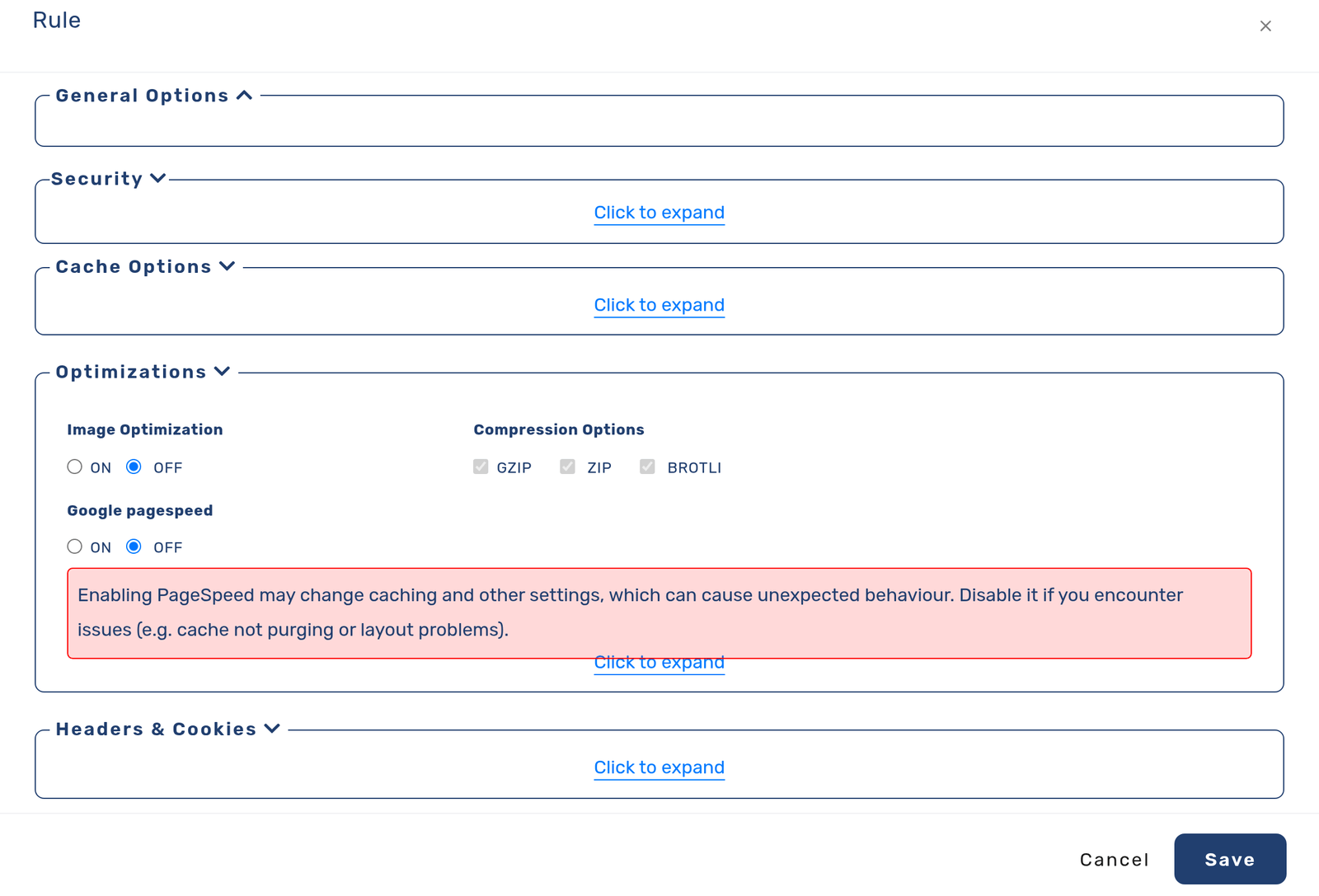
On cdn.com.tr this is a per-delivery-rule setting: each rule carries a compression list (gzip, zip, brotli) you toggle in the panel, alongside the same rule's caching and optimization options. Turning Brotli on is a checkbox, not a server migration — and because it sits on the rule, you can compress your pages aggressively while leaving your already-compressed media rule alone, which is exactly the split the previous section argued for.
Verify what you actually send
Assumptions about compression are wrong often enough that the check is worth thirty seconds. Ask for a page twice with different Accept-Encoding offers and read the Content-Encoding that comes back. While you are there, compare the transferred sizes — the difference is your saving, measured rather than believed.
One caveat when testing through a CDN: the edge may have cached the variant from an earlier request, so use a cache-busting query string to see fresh behavior, and remember that a compressed cached copy answering instantly is precisely the goal.
Two requests, two offers — read what comes back
# what does the server send when offered brotli?
curl -sI -H 'Accept-Encoding: br' https://example.com/ | grep -i content-encoding

# and when offered only gzip?
curl -sI -H 'Accept-Encoding: gzip' https://example.com/ | grep -i content-encoding

# compare actual transferred bytes (compressed vs uncompressed)
curl -so /dev/null -H 'Accept-Encoding: br' -w 'brotli:  %{size_download} bytes\n' https://example.com/
curl -so /dev/null -H 'Accept-Encoding: identity' -w 'plain:   %{size_download} bytes\n' https://example.com/
Frequently asked questions
Should I enable Brotli and Gzip together?
Yes — that is the normal setup. The negotiation picks Brotli for browsers that offer br and falls back to Gzip for the rest. Enabling both is a strict improvement over either alone.
Does compression slow my server down?
It costs CPU, but at the levels used per-request the cost is small against the bandwidth saved — and when the edge compresses cached content, your origin pays nothing at all: the compressed copy is created once and served from cache.
Why does my image CDN traffic show no compression?
Because that is correct: JPEG, PNG, WebP and AVIF are already compressed formats, and re-compressing them wastes CPU for zero (sometimes negative) gain. Compression is for text. If you want smaller images, the lever is format and sizing — WebP/AVIF conversion — not Content-Encoding.
Do I need to change my website code to use Brotli?
No. Compression is negotiated between browser and server/edge per request; your HTML, CSS and JavaScript are untouched. On cdn.com.tr it is a toggle on the delivery rule, and the edge handles the rest.