
Why video is different from everything else you serve
A web page weighs a couple of megabytes. Ten minutes of 1080p video weighs on the order of a gigabyte per viewer. That three-orders-of-magnitude gap is why a video that would be a rounding error as a page view can saturate an origin server the day it gets popular: a hundred concurrent viewers of one file is a hundred sustained high-bandwidth streams from one machine.
The economics follow the same curve. On providers that bill egress per gigabyte, a modestly successful video is a noticeable invoice; a viral one is a phone call from finance. Both problems — the bandwidth ceiling and the bill — have the same shape as every other static-content problem, which means they have the same solution: answer repeat requests from a cache close to the viewer instead of from the origin, every single time.
HLS demystified: it is a playlist and a folder of files
HLS (HTTP Live Streaming) looks exotic until you open the files. The encoder cuts the video into short segments — a few seconds each — and writes a plain-text playlist (.m3u8) that lists them in order. The player downloads the playlist, then fetches segments one by one over ordinary HTTP, a few seconds ahead of what it is showing. Adaptive quality is the same trick twice: a master playlist points at several variant playlists (1080p, 720p, 480p), and the player hops between them as bandwidth changes.
The consequence is worth stating plainly: there is no special video protocol in the delivery path. No sockets, no streaming server, no exotic infrastructure. Every request a player makes is a GET for a small static file — and small static files served millions of times is the exact workload a CDN edge exists for.
A variant playlist — plain text pointing at plain files
#EXTM3U
#EXT-X-VERSION:3
#EXT-X-TARGETDURATION:6
#EXT-X-MEDIA-SEQUENCE:0
#EXTINF:6.000,
segment_000.ts
#EXTINF:6.000,
segment_001.ts
#EXTINF:6.000,
segment_002.ts
#EXT-X-ENDLIST
The VOD pipeline: encode once, store once, serve from the edge
For video-on-demand the pipeline has three stations. Encode once, on your machine or in your build — ffmpeg turns a source video into the playlist-plus-segments folder in one command. Store once, in S3-compatible object storage, which exists precisely for write-once-read-many files like these. Serve from the edge: with the bucket behind the CDN, the first viewer of each segment fills the cache and everyone after them is answered near where they are, while your storage answers each unique file roughly once.
On cdn.com.tr the storage and the edge are one platform, so this is not an integration project: create a bucket, upload the folder, and the same account's edge — WAF and DDoS protection included — fronts it.
From source file to CDN-served stream
# 1) encode into HLS (6-second segments, one quality for brevity)
ffmpeg -i talk.mp4 -c:v h264 -c:a aac \
  -hls_time 6 -hls_playlist_type vod \
  -hls_segment_filename 'talk/segment_%03d.ts' talk/playlist.m3u8

# 2) create the bucket and an access key (panel works too)
cdnctl object-storage buckets create --account <uuid> --name videos
cdnctl object-storage access-keys create --account <uuid> --bucket <bucket_uuid>

# 3) upload the folder with the standard AWS CLI
aws --endpoint-url https://s3.cdn.com.tr s3 sync ./talk s3://videos/talk

# the player now points at the playlist behind your CDN hostname:
#   https://video.example.com/talk/playlist.m3u8
The cache rules that make or break video delivery
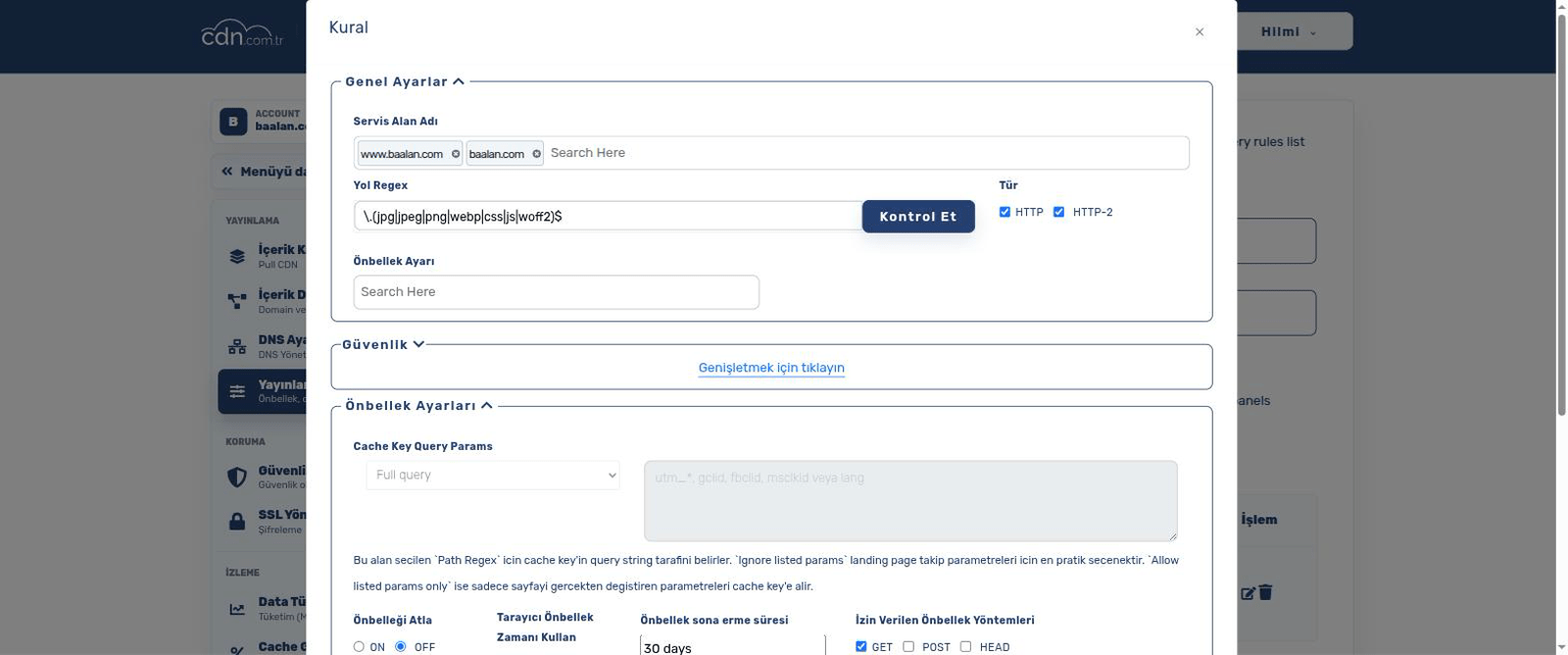
Video rewards the cache-header discipline other content merely appreciates, because the two file types in an HLS stream want opposite treatment.
Segments are immutable by construction — segment_042.ts will never contain different bytes, because a re-encode writes a new folder. Cache them as long as you like; a year is not reckless, it is correct. Every long-cached segment is bandwidth your origin never serves again.
Playlists are the moving part. For finished VOD they change only when you replace the video, so an hour is fine. The moment a playlist is being appended to — which is how near-live works — it must be cached for seconds, because the player re-reads it to discover new segments. Getting this one header wrong is the classic video bug: viewers frozen on old segments while the playlist tells them nothing new exists.
On cdn.com.tr you set exactly this split as delivery rules in the panel: one rule matching the segment path with a long time, one matching *.m3u8 with a short one.
Details that bite: ranges, CORS, and compression
Three practical notes save most video support tickets. First, range requests: players and browsers routinely ask for byte ranges of media files, and the edge serves partial content from cache — this is also what lets a viewer jump to minute six without downloading minutes one through five of an MP4.
Second, CORS: if the player runs on a different hostname than the video files, the browser will demand Access-Control-Allow-Origin headers on segments and playlists, and the symptom of forgetting is a player that works in a bare tab but not embedded in your page.
Third, compression: leave it off for media. Video and audio are already compressed by the codec; gzipping a .ts segment spends CPU to save nothing. Compress the playlists if you like — they are text — but the win is microscopic. The edge already knows not to re-compress media types; the note matters for your own origin configuration.
And live streaming? An honest answer
Live is the same delivery story with a harder supply chain. The delivery half is identical: a live HLS stream is still a playlist and segments, just with the playlist growing every few seconds and cached very briefly. An edge serves that beautifully — thousands of viewers reading files that are seconds old is still just cache hits.
What live adds is everything before the files exist: ingest (receiving the camera feed over RTMP or SRT), real-time transcoding into the quality ladder, and packaging — a running pipeline with its own failure modes, not a folder you upload once. That pipeline is not something you assemble casually, and it is not what this platform's self-serve product does: cdn.com.tr is the storage-and-delivery half of the story. If your project needs the full live chain, talk to us about it directly rather than forcing it into a VOD-shaped workflow — and be wary of any provider that sells "live streaming" without saying who runs the encoder.
Frequently asked questions
Can I just serve an MP4 file directly instead of HLS?
For short clips, yes — an MP4 behind the CDN with range requests works and players scrub it fine. HLS earns its complexity when videos get long or audiences vary: adaptive quality, faster starts, and small segments that cache and resume better than one large file.
Does cdn.com.tr encode my videos?
No — encoding is your side of the pipeline (ffmpeg locally or in CI is the standard route, and the command above is a complete starting point). The platform stores the encoded output in object storage and delivers it through the edge.
What happens when a video goes viral?
That is the scenario the architecture is for: after the first viewer per edge location, segments are answered from cache, so origin load barely moves while delivery scales with the edge. The thing to watch is your cache headers — immutable segments cached long is what makes the math work.
How do I replace a video without viewers seeing a broken mix of old and new?
Encode into a NEW folder (talk-v2/) and switch the player to the new playlist URL — old cached segments become irrelevant instead of wrong, no purge needed. Overwriting files in place and purging works, but versioned paths are the calmer pattern, exactly as with any static asset.