
What hotlinking is and what it costs
Every image on your site has a URL, and nothing in HTML stops another site from putting that URL in its own img tag. When it does, every visitor to their page downloads the file from your infrastructure: their content experience, your bandwidth, your CDN bill. The same applies to PDFs, fonts, video files — anything addressable.
The cost profile is what makes it sneaky. One embed costs nothing noticeable; a popular forum post, a viral aggregator page or a scraper-built site embedding hundreds of your images does not announce itself — it just shows up as traffic you cannot match to your own pages. If your analytics show significant media requests with foreign referrers, you are funding someone else's site.
How Referer-based protection works
Browsers attach a Referer header to sub-requests: when a page loads an image, the request carries the page's address. Hotlink protection reads it at the edge and applies a simple policy — if the requesting page belongs to your own domains (or partners you allow), serve; if it belongs to somewhere else, refuse.
The refusal happens at the edge, before your origin sees anything, so the stolen bandwidth stops immediately. Some sites serve a small "image hosted by…" placeholder instead of an outright block, which turns the theft into free advertising — a nice trick, but plain refusal is the standard and the simpler default.
The honest limits: what this does not protect
Referer is client-supplied. A script can fake it, a privacy extension can strip it, and some legitimate contexts send none at all. So be precise about what hotlink protection is: a cost control that stops the overwhelmingly common case — casual embedding by other websites — not an access-control mechanism.
Two consequences follow. First, decide what to do with EMPTY referers: block them and you break visitors behind strict privacy tools, direct link opens, and some feed readers; allow them and a determined scraper can slip through by sending none. Most sites allow empty and accept the gap. Second, anything that must be genuinely private — paid downloads, user documents — needs real authentication or expiring signed URLs, which is a different feature solving a different problem.
Turning it on without breaking legitimate use
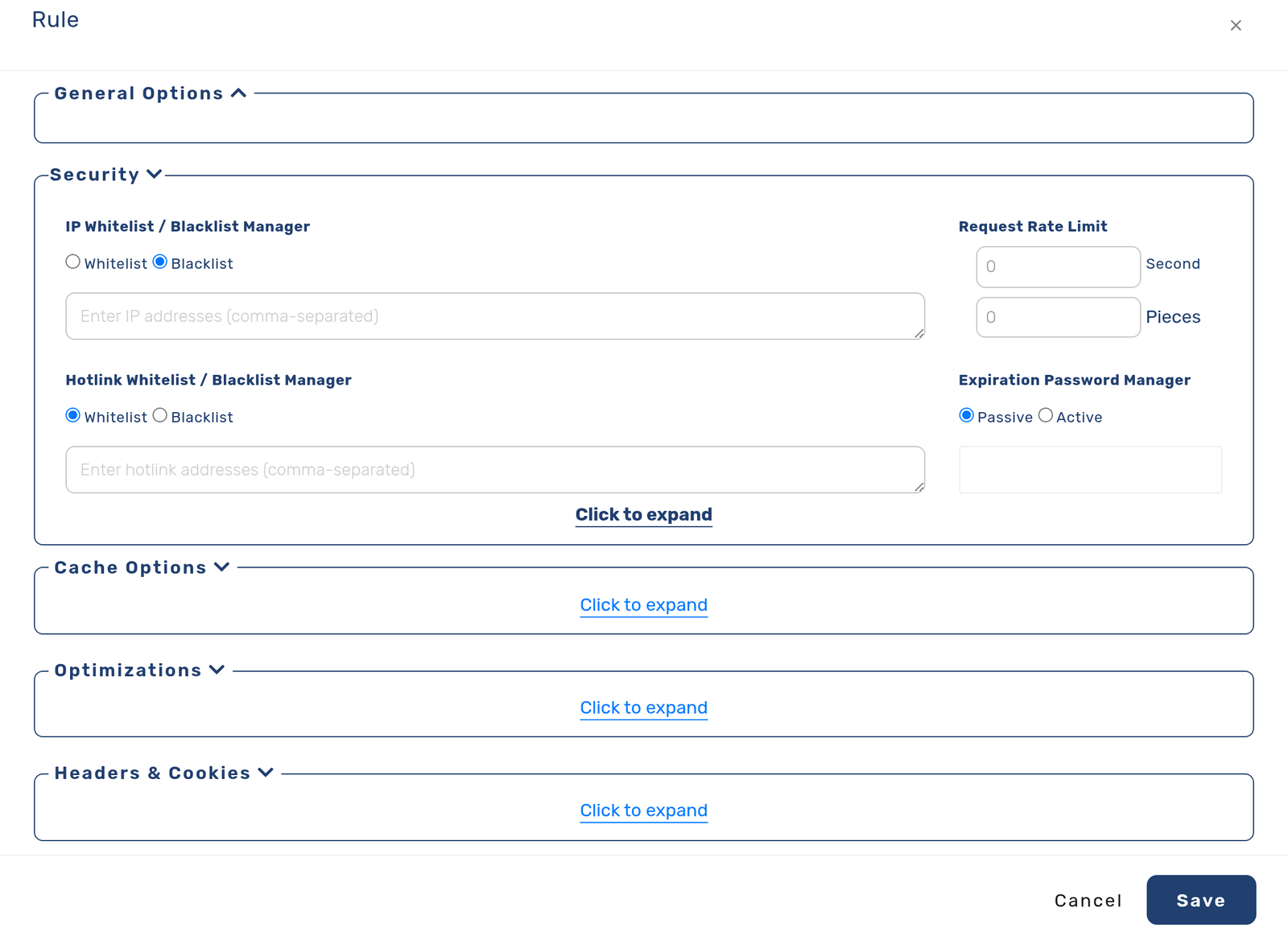
The failure mode of hotlink protection is over-blocking: your newsletter's images in mail clients, your pages saved to read-later apps, a partner site you actually want embedding you. So scope it deliberately.
On cdn.com.tr the control lives on the delivery rule: a hotlink whitelist or blacklist per rule, managed in the panel next to the same rule's cache and security settings. That placement is the point — apply it to the rule matching your media paths, list your own domains (including www and any subdomains that legitimately embed), add partners as needed, and leave your HTML rule untouched. Then test the three cases before walking away: your own page still renders its images, a foreign referer is refused, and a direct open in a new tab behaves the way you chose for empty referers.
Verify all three cases with curl
# your own page as referer — must serve
curl -s -o /dev/null -w '%{http_code}\n' -e 'https://www.example.com/page' https://cdn.example.com/img/product.jpg

# foreign referer — must be refused
curl -s -o /dev/null -w '%{http_code}\n' -e 'https://other-site.com/thread' https://cdn.example.com/img/product.jpg

# no referer — whichever you chose, verify it is deliberate
curl -s -o /dev/null -w '%{http_code}\n' https://cdn.example.com/img/product.jpg
When hotlink protection is not enough: signed URLs
Hotlink protection asks where the request came from, and a referer is trivial to omit or fake. For a file that is genuinely paid for — a video, a report, a licensed asset — the stronger control is a signed URL: a link that carries a signature and an expiry time, and stops working when either is wrong.
On cdn.com.tr this is a setting on a delivery rule. Turn it on for the path that holds the protected files, set a secret, and your application generates links by hashing the expiry, the path and the secret together. The edge checks the signature before anything else: an unsigned request gets 403, an expired one gets 410, and a valid one is served and cached normally. Because the two failures use different status codes, a support report can be classified without asking the visitor anything.
The two controls answer different questions and they compose well. Hotlink protection keeps your images off other people's blogs; signed URLs make sure the download link you emailed is worthless to whoever it gets forwarded to.
Frequently asked questions
Will hotlink protection break Google Images?
It can, if you block empty and search-engine referers — and being in image search is usually traffic you want. Allow the search engines' referers (and typically empty ones) unless you have a specific reason not to.
Does it stop people downloading and re-uploading my images?
No. Hotlink protection stops your INFRASTRUCTURE serving their audience; it cannot stop copying. Copy-protection is a legal and watermarking question, not a bandwidth one.
Should I protect everything or just media?
Just media, via the rule matching those paths. Protecting HTML makes no sense (pages are the thing you want visited), and per-rule scoping is exactly what keeps the control from breaking normal browsing.
What about paid or private files?
Not this feature. Referer checks deter casual embedding; for content with real value use authentication or expiring signed URLs, so possession of the link alone is not enough.