Why move files off the application disk
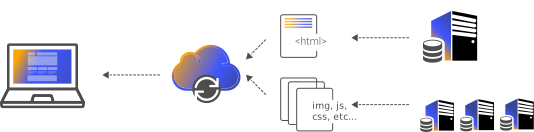
Application containers should be stateless so they can be redeployed, scaled, and rolled back without losing user uploads. When avatars, product photos, invoices, and video get written to the container filesystem, every restart risks data loss and every replica has a different set of files. Object Storage solves this by giving all replicas one shared, durable place to read and write. Your app stays disposable while the data lives on independently.
Genuinely S3-compatible, not a lookalike
The service speaks the S3 API, so the tools you already use keep working: the aws-cli, boto3, the AWS SDK for JavaScript, the Laravel and Symfony S3 filesystem drivers, rclone, and s3cmd all talk to it once you set the endpoint URL and key pair. Multipart uploads for large files, object metadata, and content-type handling behave the way S3 developers expect. That means migrating an app that already uses S3 is usually a config change rather than a code rewrite.
Buckets, access keys, and blast radius
You organize data into buckets and control access with access key ID and secret key pairs that you can rotate or revoke at any time. Keeping one key per app or per bucket limits the blast radius: if a key leaks in a log or a client bundle, you revoke that one pair and re-mint it without touching every other service. The panel lists which keys exist so you can audit and retire ones that are no longer used.
Storage and CDN working as one
Because Object Storage and the edge CDN are the same platform, you can serve bucket objects through cache without wiring up a separate origin. A public bucket or a signed edge route becomes a fast download path where popular files are cached close to users and never hit storage repeatedly. When you replace a file under an existing key, a targeted purge from the panel or cdnctl refreshes the edge so nobody is served a stale copy.
Binding storage to container apps
Instead of pasting credentials into your Dockerfile or committing them to a repo, you bind a bucket to a Container App and the platform delivers the endpoint and keys as environment variables, optionally under a prefix so multiple buckets stay distinct. Your code reads standard env names at runtime, secrets never appear in the image, and rotating a key updates the binding rather than forcing a rebuild. This keeps the twelve-factor separation of config from code intact.
Backups and cold data
Object Storage is a natural home for database dumps, application backups, and archival exports that you want off the primary server but still able to restore quickly. Because access is key-based and scoped, a backup job can hold a write-only-style workflow key that is separate from the keys your live app uses. Scripted through cdnctl in a nightly job, uploads and retention cleanups run unattended, and you keep a usage limit on the bucket so archives do not grow without anyone noticing.
How to set it up, step by step
Create a bucket
In the panel open Object Storage and choose Create Bucket. Give it a DNS-safe name (lowercase letters, numbers, and hyphens) and decide whether objects should be private by default or publicly readable. Private is the right choice for backups and originals you will sign or proxy; public read fits assets you intend to serve straight through the CDN.
Generate an access key pair
Open the Access Keys tab and generate a key. You get an access key ID and a secret key; the secret is shown only once, so copy it into your secret manager immediately. Scope the key to the bucket it needs rather than reusing one master key across every project, so a leak can be contained by revoking a single pair.
Point an S3 client at the endpoint
Configure any S3 SDK or the aws-cli with the cdn.com.tr endpoint URL shown on the bucket page, path-style addressing, and your key pair. For example: aws --endpoint-url <endpoint> s3 cp ./poster.jpg s3://my-media/posters/. No custom client is required because the API speaks the S3 protocol.
Bind the bucket to a container app
On a Container App choose Bind Object Storage and select the bucket. The platform injects the endpoint, region, access key, and secret as environment variables (with an optional prefix such as ASSETS_) so your code reads them from the environment instead of hardcoding credentials in the image or repo.
Put it behind the CDN
Attach a domain or use the bucket's edge route so objects are served from cache at edge locations. Set cache headers on upload, and use purge from the panel or cdnctl when you overwrite a file under the same key so viewers pick up the new version.
Set limits and automate with cdnctl
Apply a usage limit on the bucket to guard against runaway growth, and script routine tasks with cdnctl so backup uploads and cleanups run from CI without opening the panel. Rotate keys periodically from the same Access Keys tab.
Example scenarios
An e-commerce site stores every product image and original upload in a bucket, serves the derivatives through the CDN, and keeps the app containers stateless so deploys never touch user files.
A container app scaled to several replicas writes user uploads to one bucket, so every instance reads the same files and a restart or scale event never loses data.
A cron or CI job uses a scoped key and cdnctl to push compressed database dumps into a private bucket each night, with a usage limit and retention cleanup keeping cost predictable.
A team already using AWS S3 repoints their SDK endpoint and keys to cdn.com.tr, uses rclone to copy objects over, and ships without rewriting storage code.
Frequently asked questions
Which S3 tools and SDKs actually work against it?
The common ones: aws-cli, boto3, the AWS SDK for JavaScript, rclone, s3cmd, and the S3 filesystem drivers in Laravel and Symfony. Set the endpoint URL from the bucket page, use path-style addressing, and supply your access key and secret. Multipart uploads for large objects are supported.
Can I serve bucket files directly to the public through the CDN?
Yes. Make the bucket or object publicly readable, or use the bucket's edge route, and attach a domain. Objects are then cached at edge locations so repeat downloads are served from cache instead of hitting storage every time.
What happens when I overwrite a file under the same key?
Storage takes the new object immediately, but the edge may still hold the previous version until its cache expires. Run a purge for that path from the panel or with cdnctl right after the upload so viewers get the fresh file.
If an access key leaks, what do I do?
Revoke that key pair from the Access Keys tab and generate a new one. Because you should scope keys per bucket or per app, revoking one pair does not disrupt your other services. Update the binding or your secret store with the new secret.
Do I have to hardcode credentials in my container image?
No, and you should not. Bind the bucket to the Container App and the endpoint, region, access key, and secret arrive as environment variables, optionally under a prefix. Your code reads them at runtime, so secrets stay out of the image and the repo.
How do I keep storage from growing without limit?
Set a usage limit on the bucket so it cannot balloon unnoticed, and for backup buckets script a retention cleanup with cdnctl so old dumps are pruned on a schedule. The panel shows current usage per bucket so you can track it.