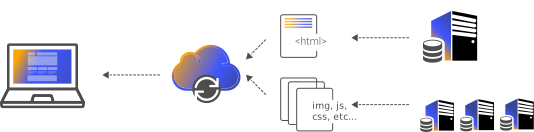
The problem: media traffic crushes the origin
When product photos, hero videos, PDFs, and user uploads sit on the same server that renders your pages, every image request competes with real application work for CPU, disk I/O, and bandwidth. A single popular page with thirty images multiplies traffic thirtyfold against one origin, and a traffic spike or a large video download can starve the app of the resources it needs to respond at all. Storage on an app server is also hard to scale: you eventually run out of disk, and backups of a fat filesystem become slow and fragile. Separating bytes from logic is the first structural fix, and it is what this scenario delivers.
How cdn.com.tr solves it: buckets plus edge cache
You store every asset in an S3-compatible Object Storage bucket, which gives you effectively elastic capacity and an endpoint your applications talk to with standard S3 tooling. In front of that bucket you place the cdn.com.tr CDN, so the actual delivery to browsers happens from edge locations, not from the bucket and never from your app server. The first request for a file fills the edge cache; every subsequent request for that file is served from the edge without touching Object Storage again. The result is that your origin handles almost none of the byte traffic, your storage layer scales independently of compute, and users get assets from a nearby edge node instead of a single distant server.
Access keys, public assets, and private files
Each bucket is controlled by access key and secret pairs that you create, rotate, and revoke from the panel. For public media such as catalog images you deliver through the CDN domain and keep the bucket's raw endpoint out of your markup. For private material such as paid downloads or internal backups you keep the objects non-public and hand out short-lived signed URLs generated with the access key, so a link expires instead of living forever. Because each integration gets its own key, a compromised uploader or a departing contractor is a one-click revoke rather than a platform-wide password reset.
Cache-control and purge without cache-poisoning yourself
The cache is only as good as the headers you set on your objects. Give long-lived, versioned assets a far-future Cache-Control with immutable, and give things that genuinely change often a shorter TTL. The cleanest pattern is content-hashed filenames: when an image changes its URL changes, so the edge naturally serves the new file and you never fight stale cache. When you must overwrite a file at the same URL — a logo swap, a corrected PDF — a targeted purge from the panel or cdnctl drops that object from every edge location so the next request re-pulls it from the bucket. This keeps invalidations rare, precise, and safe.
Scaling from a few images to a full media library
The same setup that serves a handful of logos scales to a catalog of hundreds of thousands of product photos, a library of on-demand video, or a rolling archive of nightly backups, because Object Storage grows without you provisioning disks and the edge absorbs the read traffic. Media-heavy sites see the sharpest wins: pages get lighter and faster as images stream from nearby edges, and origin bandwidth — often the most expensive and most fragile resource — drops dramatically. Backups get a clean home too, isolated in their own private bucket with their own access key, away from the public delivery path.
Where it fits with the rest of the platform
This scenario is deliberately storage-and-delivery focused, but it composes with everything else on the account. A WordPress or PHP application can offload its uploads directory to a bucket and keep serving the site through the same edge. A container app can bind the bucket as environment variables and read or write objects directly. DNS and Auto SSL handle the delivery domain, and purge, logs, and status give you the operational visibility to confirm assets are flowing from cache and not silently missing to origin on every request.
How to set it up, step by step
Create a bucket
In the panel open Object Storage and create a bucket for your media (for example media-prod). You get an S3-compatible endpoint, region, and bucket name. Keep separate buckets for public assets and private backups so their access policies never overlap.
Generate a scoped access key
Create an access key / secret pair for the bucket and paste it into your uploader, CMS, or S3 SDK. Use one key per application so you can rotate or revoke a single integration without breaking the others. Keys can be rotated from the panel at any time if one leaks.
Upload with correct headers
Push assets with your existing S3 client, aws-cli, or plugin, setting Content-Type and a long Cache-Control (for example max-age=31536000, immutable) on files that never change. Use content-hashed filenames like logo.a1b2c3.png so a new version is a new URL and never needs invalidation.
Put the CDN in front
Attach a delivery domain (for example cdn.example.com) to the CDN and point its origin at the bucket endpoint. Requests now hit the edge first, are cached across locations, and only miss through to Object Storage on the first request per asset. Auto SSL issues the certificate for the delivery domain automatically.
Verify cache behavior
Load an asset twice and check the response headers for a HIT on the second request. Confirm your Cache-Control is being honored and that image/video MIME types are correct so browsers and the edge cache them properly.
Wire up purge
When you overwrite a file at the same URL, issue a purge from the panel or via cdnctl so the edge drops the stale copy. For assets you version by filename you rarely need this, which is exactly why content-hashed names are recommended for high-churn media.
Example scenarios
Thousands of product photos live in a bucket and stream from the edge, so listing and detail pages stay fast during campaigns without loading the store's app server.
On-demand video and installer files are stored once and delivered from cache, keeping origin bandwidth flat even when a file suddenly goes viral.
Nightly database and file backups go to a private bucket with a dedicated access key, kept entirely off the public delivery path and rotatable on demand.
Frequently asked questions
Is the storage really S3-compatible with my existing tools?
Yes. Buckets expose an S3-compatible endpoint, so aws-cli, s3cmd, rclone, and the AWS SDKs work by pointing them at the endpoint with your access key and secret. Most CMS and framework upload plugins that support S3 work the same way.
Do users hit the bucket directly, or the CDN?
For public delivery you point a CDN domain at the bucket endpoint and publish that domain in your markup, so users always hit the edge cache. The raw bucket endpoint stays behind the CDN and is not what your pages reference.
How do I serve private files without making the bucket public?
Keep the objects private and generate short-lived signed URLs with your access key. The link grants time-limited access and then expires, which is the right pattern for paid downloads, invoices, or anything that should not be permanently public.
If I replace an image at the same filename, why does the old one still show?
Because the edge cached the previous version under that URL. Issue a purge for that object from the panel or cdnctl, or adopt content-hashed filenames so each new version has a new URL and never needs purging.
What Cache-Control should I set on media?
Long-lived versioned assets should use a far-future max-age with immutable; frequently changing files should use a shorter TTL. Setting the header at upload time is what lets the edge hold the file instead of re-fetching it from the bucket.
Can I revoke access if a key leaks?
Yes. Access keys are rotated and revoked from the panel per integration. Because you issue one key per application, revoking a leaked key affects only that integration rather than every service reading the bucket.