CONTAINER APPS · CASE STUDY
Ship without fear: blue/green preprod ⇄ prod with one click
A real workflow for a team that runs a live app on Managed Containers and wants long deploy/test
cycles without touching production: build a preprod copy, test it
for as long as you like on its own subdomain, then switch the live domain to it
instantly — and roll back just as fast if anything looks wrong. Shown
two ways: from the management panel, and with the
cdnctl CLI.
The scenario
ajansspor.com runs on Managed Containers (a prod container app + a managed MySQL). The team
wants to test a sizable change for days, then go live in seconds with a guaranteed instant rollback.
With blue/green we never edit the running prod app: we clone it to a preprod environment, test there,
then move the production domain over.
- prod (blue) — the live app serving
ajansspor.com. - preprod (green) — a clone, reachable on its own
ca-*.cdn.com.trsubdomain. - Promote moves
ajansspor.comfrom prod to preprod in seconds, no downtime. - Rollback moves it back — and, for data changes, restores an automatic DB snapshot.
When the product is more than one app (web + api + worker)
Most real products are a stack, not a single container. Blue/green works on the whole stack as one unit: a project is the set of apps in your account, and one action clones, promotes or rolls back all of them together.
- Create preprod from all apps clones every prod app (web, api, worker, …) into a paired preprod copy under one project.
- App-to-app links are rewired automatically — if
webtalks toapi, the preprodwebtalks to the preprodapi. The preprod stack is self-contained and never points back at production. - Promote (whole project) moves every app’s production domain to its preprod copy at once; Rollback (whole project) reverses them all. A change that spans several services goes live — or is undone — as a single unit.
- Only one service changed? Use the single-app Create preprod / Promote on just that app.
How videoonly would use this: its apps (front-end, API, workers) live in one account. You’d
click Create preprod from all apps (state shared to reuse the live DB/Redis, or
clone to test a migration on copied data), validate the whole stack on the ca-*
subdomains, then Promote (whole project) to move every production hostname to the new versions in
seconds — with Rollback (whole project) as the instant escape hatch.
State: what preprod shares with prod
Pick this when you create the preprod (the --state / dropdown):
- shared — preprod uses the same managed DB/Redis and object-storage buckets as prod (via secure cross-app references; no copy). Best for code/UI changes.
- clone — preprod gets its own managed MySQL with a copy of prod’s data. Safe for data/schema changes; prod data is untouched.
- isolated — preprod starts clean.
On Promote the platform takes an automatic DB snapshot first, so Rollback can revert data too. Static/media on a persistent volume can be shared (RWX) so uploads stay consistent.
Walkthrough A — in the panel
- Open your CDN account → the Platforms tab → Managed Container Apps.
The Blue/Green environments panel sits just above Your apps.
(If this account still serves via Pull/Push CDN and has no apps yet, first click
Enable Apps Alongside Current Delivery under Platforms.)
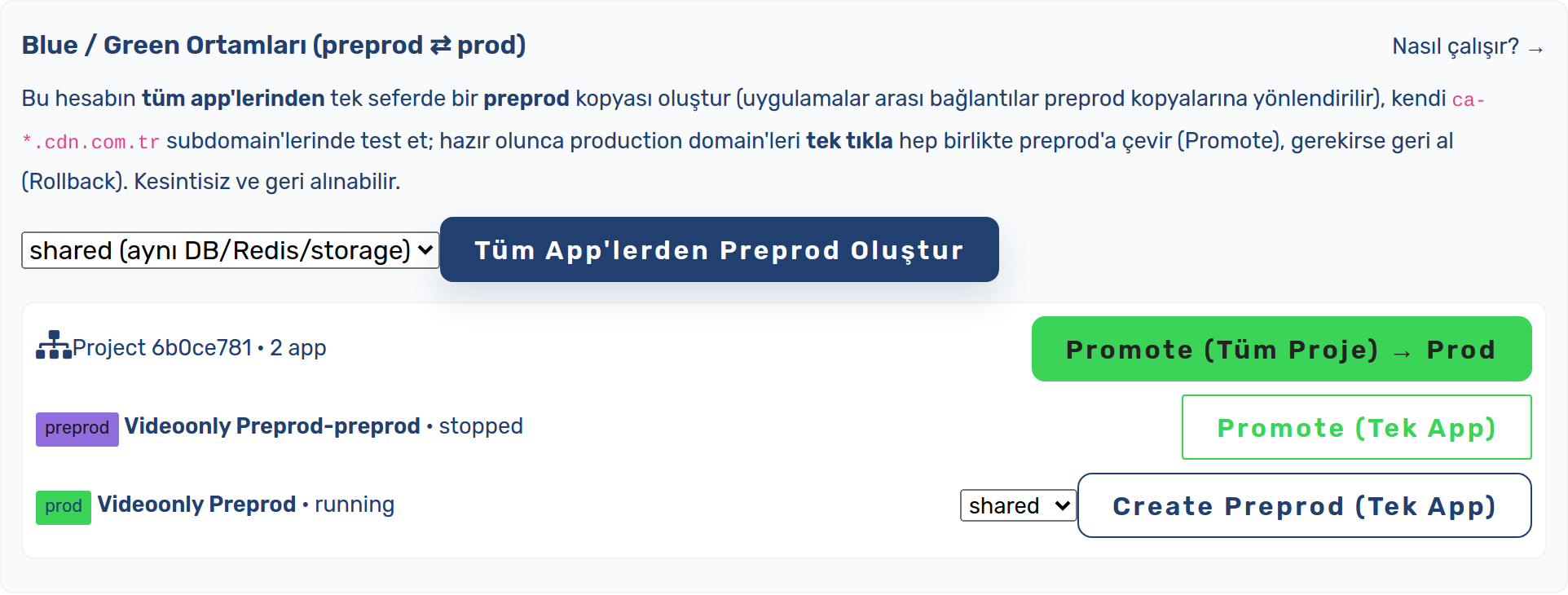
Blue/Green environments panel above the apps list - Pick a state and click Create preprod from all apps (whole product) — or
Create preprod (single app) if only one service changed.

Pick a state, then “Create preprod from all apps” (whole project) — or create one for a single app - The preprod app(s) appear paired with prod under one project (each on its own subdomain).
Deploy and test them as long as you need — production keeps serving traffic untouched.

The project with its prod and preprod apps, and whole-project Promote / Rollback - When ready, click Promote (whole project) → prod. Every production domain switches to its
preprod copy in seconds.

Promote (whole project) moves every production domain to its preprod copy - If anything is wrong, click Rollback (whole project) — traffic returns to the previous apps instantly (and the pre-promote DB snapshot is restored). The Rollback button appears on the panel once a promote has run.
Screenshots above are real captures of the live CDN.com.tr panel (Platforms → Managed Container Apps → Blue/Green environments).
Walkthrough B — with cdnctl
The same flow, scriptable end-to-end. Single app:
# 1) Clone prod → preprod (shared add-ons; use --state clone for isolated DB+data)
cdnctl container apps create-preprod --account <uuid> --app <prod_app_uuid> --state shared

# 2) Deploy + test the preprod app on its own subdomain
cdnctl container apps deploy  --account <uuid> --app <preprod_app_uuid>
cdnctl container apps expose  --account <uuid> --app <preprod_app_uuid>
cdnctl container apps status  --account <uuid> --app <preprod_app_uuid>

# 3) Go live: move the production domain to preprod (instant, no downtime)
cdnctl container apps promote --account <uuid> --app <preprod_app_uuid>

# 4) If needed, roll back (traffic + pre-promote DB snapshot)
cdnctl container apps rollback-promotion --account <uuid> --app <prod_app_uuid>
Whole product (multi-app project) — admins/ops run it on the server with artisan:
# Clone EVERY prod app in the account into a paired preprod (one project)
php artisan container-apps:env create-preprod --account <uuid> --all --state shared

# ... deploy & test each preprod app on its ca-* subdomain ...

# Promote the whole project (all production domains move together)
php artisan container-apps:env promote  --account <uuid> --project <project_uuid>

# Roll the whole project back (traffic + DB snapshots for every app)
php artisan container-apps:env rollback --account <uuid> --project <project_uuid>
The same group actions are available in the panel (the “Blue/Green environments” panel: Create preprod
from all apps, Promote / Rollback (whole project)) and over the customer API
(POST …/platform/container/project/{create-preprod,promote,rollback}). Low-level building
blocks: container-apps:switch-origin (move one domain) and
container-apps:db clone|snapshot|restore (managed-MySQL data ops).
Why it’s safe
- Production is never edited in place — you build and test on a separate app.
- Instant + reversible — Promote/Rollback is a domain-ownership switch (seconds), not a rebuild.
- Data is reversible too — Promote auto-snapshots the DB; Rollback restores it.
- Per account / per domain — DNS and TLS are unaffected; the production certificate stays.
See also the Blue/green environments guide.